HDR Video Capture: From Passthrough to Full Recording Support
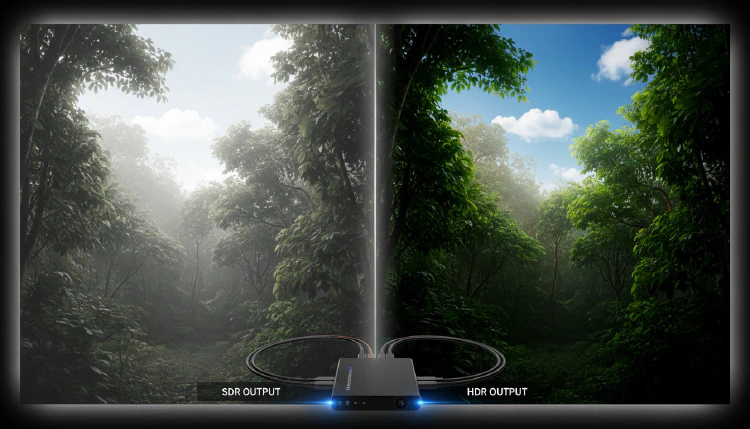
High Dynamic Range (HDR) video has transformed how we experience visual content, delivering brighter highlights, deeper blacks, and a wider color gamut than traditional Standard Dynamic Range (SDR) video. As HDR becomes standard on gaming consoles, streaming services, and displays, the capture card industry is racing to keep up.
Understanding HDR Formats
Before diving into capture capabilities, it’s important to understand the major HDR formats:
- HDR10: The most widely adopted format, using static metadata to define brightness and color parameters for the entire content. Supported by virtually all HDR-capable devices.
- HDR10+: Samsung’s enhancement that adds dynamic metadata, adjusting settings scene by scene.
- Dolby Vision: The premium format with frame-by-frame dynamic metadata for the most precise HDR experience.
- HLG (Hybrid Log-Gamma): Designed for broadcast, backward-compatible with SDR displays.
As Arzopa’s guide explains, the fundamental difference between HDR10 and Dolby Vision lies in metadata handling: HDR10 uses static metadata (set once for the entire video), while Dolby Vision employs dynamic metadata for scene-by-scene adjustments.
Current State of HDR Capture
What’s Supported
Most modern capture cards now support HDR10 passthrough — meaning they can pass an HDR signal through to your display without degrading it. However, actually recording in HDR is a different story.
The Elgato 4K60 Pro Mk.2 supports HDR10 passthrough and capture, but notably, Dolby Vision is NOT supported for recording. This limitation is common across consumer capture cards — while HDR10 capture has become widespread, Dolby Vision capture remains limited to professional equipment.
Professional Solutions
For professional HDR workflows, AJA’s HDR solutions offer more comprehensive support. Their KONA and Io product lines can handle various HDR formats, and developers with Dolby Vision licenses can tunnel Dolby Vision signals through select AJA capture cards.
HDR Capture Card Recommendations
| Card | HDR10 Passthrough | HDR10 Capture | Dolby Vision |
|---|---|---|---|
| Elgato 4K60 Pro Mk.2 | Yes | Yes | No |
| Elgato 4K Pro (2024) | Yes | Yes | No |
| AVerMedia GC575 | Yes | Yes | No |
| AVerMedia Live Gamer Ultra 2.1 | Yes | Yes | No |
| AJA KONA 5 | Yes | Yes | Licensed only |
Challenges in HDR Recording
Several technical challenges make HDR capture more complex than SDR:
- File sizes: HDR content requires 10-bit color depth (vs. 8-bit for SDR), significantly increasing file sizes
- Software support: Not all editing software handles HDR footage natively
- Display requirements: Proper HDR preview during editing requires an HDR-capable monitor
- Platform limitations: Many streaming platforms still don’t support HDR uploads
Practical Tips for HDR Capture
If you’re looking to capture HDR content today:
- Start with HDR10: It’s the most widely supported format for both capture and playback
- Check your entire pipeline: Ensure your capture card, editing software, and export settings all support HDR
- Use high bitrates: HDR content benefits from higher bitrates to preserve color accuracy
- Consider your audience: If your content primarily goes to platforms without HDR support, the extra effort may not be worthwhile
The Road Ahead
As HDMI 2.1 capture cards become more common, HDR capture capabilities will continue to improve. The combination of higher bandwidth and more sophisticated processing will eventually make HDR capture as routine as SDR capture is today.
Sources: