ClonerAlliance RecDual Dongle and RecDual Link App: Portable Dual-Input Recording Meets Smart Device Management
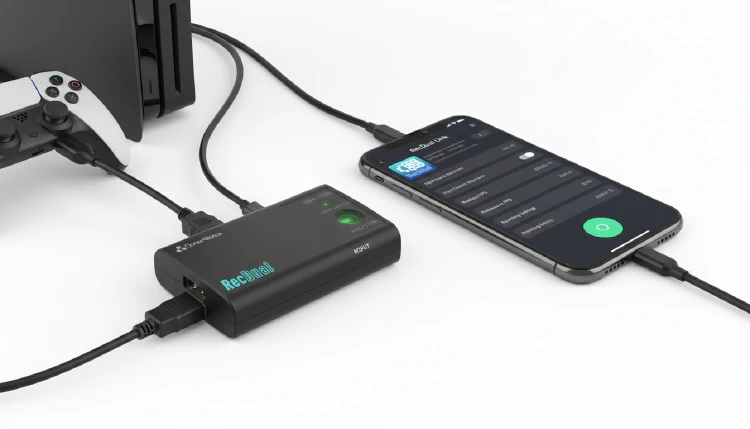
ClonerAlliance is excited to announce the launch of two new products that together create a complete portable recording ecosystem: the ClonerAlliance RecDual Dongle (CA-1290) and the RecDual Link App.
ClonerAlliance RecDual Dongle (CA-1290)
The RecDual Dongle is an ultra-portable video recorder that packs dual-input recording, 4K passthrough, and fast charging into a compact, fanless design.
Dual-Input Recording
The RecDual Dongle accepts two video input sources:
- HDMI: For game consoles, cameras, set-top boxes, and other HDMI devices
- USB-C (DisplayPort): For laptops, tablets, and smartphones with DP Alt Mode
Switch between inputs with a single button press, making it easy to record from multiple devices without rewiring.
4K@60fps Passthrough
Your display receives the full 4K@60fps signal, ensuring you never sacrifice visual quality while recording. Game at full resolution and frame rate while the RecDual Dongle captures your content in the background.
1080p@60fps Recording
Record at Full HD resolution and 60fps with H.264 MP4 encoding at up to 30Mbps bitrate. Files are saved to a TF (microSD) card for easy transfer and management.
66W Fast Charging
When connected via USB-C, the RecDual Dongle provides 66W fast charging to the source device. Record from your laptop or phone for hours without battery anxiety.
Key Specifications
| Feature | Specification |
|---|---|
| Recording | 1080p@60fps H.264 MP4 |
| Max Bitrate | 30 Mbps |
| Passthrough | 4K@60fps |
| Video Inputs | HDMI + USB-C (DP) |
| USB-C Charging | 66W |
| Audio | 3.5mm (MIC IN / LINE OUT) |
| Storage | TF (microSD) card |
| Loop Recording | Yes |
| Scheduled Recording | Yes |
| Design | Fanless |
Additional Features
- Loop Recording: Automatically overwrite oldest files when storage is full — perfect for continuous recording scenarios
- Scheduled Recording: Set recording start and stop times for unattended capture
- Instant Playback: Review recordings directly through the device
- Hardware Encoding: Zero load on your source device
- LED Indicators: Clear visual feedback for recording status and source switching
RecDual Link App
The RecDual Link is a companion app that transforms how you manage your RecDual Dongle. Available on Android, iOS, Windows, and macOS, it provides a modern, intuitive interface for device management.
App Features
- Device Activation: Activate and bind your RecDual Dongle via QR code scanning or serial number entry
- Graphical Configuration: Adjust recording settings, resolution, bitrate, and other parameters through an easy-to-use graphical interface
- One-Click Firmware Upgrade: Keep your device up to date with the latest firmware — no manual file transfers required
- Video Playback and File Management: Browse, play, and manage your recorded videos directly from the app
- Multi-Language Support: Available in English and Chinese
- Dark/Light Mode: Choose your preferred theme
App Availability
| Platform | Size | Download |
|---|---|---|
| Android | 25 MB | APK / Google Play |
| iOS | 30 MB | App Store |
| Windows | 45 MB | Installer included |
A Complete Portable Recording Ecosystem
Together, the RecDual Dongle and RecDual Link App create a seamless portable recording workflow:
- Connect your source device via HDMI or USB-C
- Configure recording settings through the RecDual Link App
- Record at 1080p@60fps while your source charges at 66W
- Manage your recordings and firmware updates through the app
Important Notes
- HDR content is not supported
- HDCP-protected content cannot be recorded
- USB-C input requires DisplayPort Alt Mode support on the source device
Availability
The ClonerAlliance RecDual Dongle and RecDual Link App are available now from the ClonerAlliance website.
For more information:
- RecDual Dongle: https://www.cloner-alliance.com/recdual-dongle/
- RecDual Link App: https://www.cloner-alliance.com/help/download/software/recdual-link/