Built-in Time Base Correction Features in ClonerAlliance Box Pro
Understanding the Challenge: VHS and Analog Video Degradation
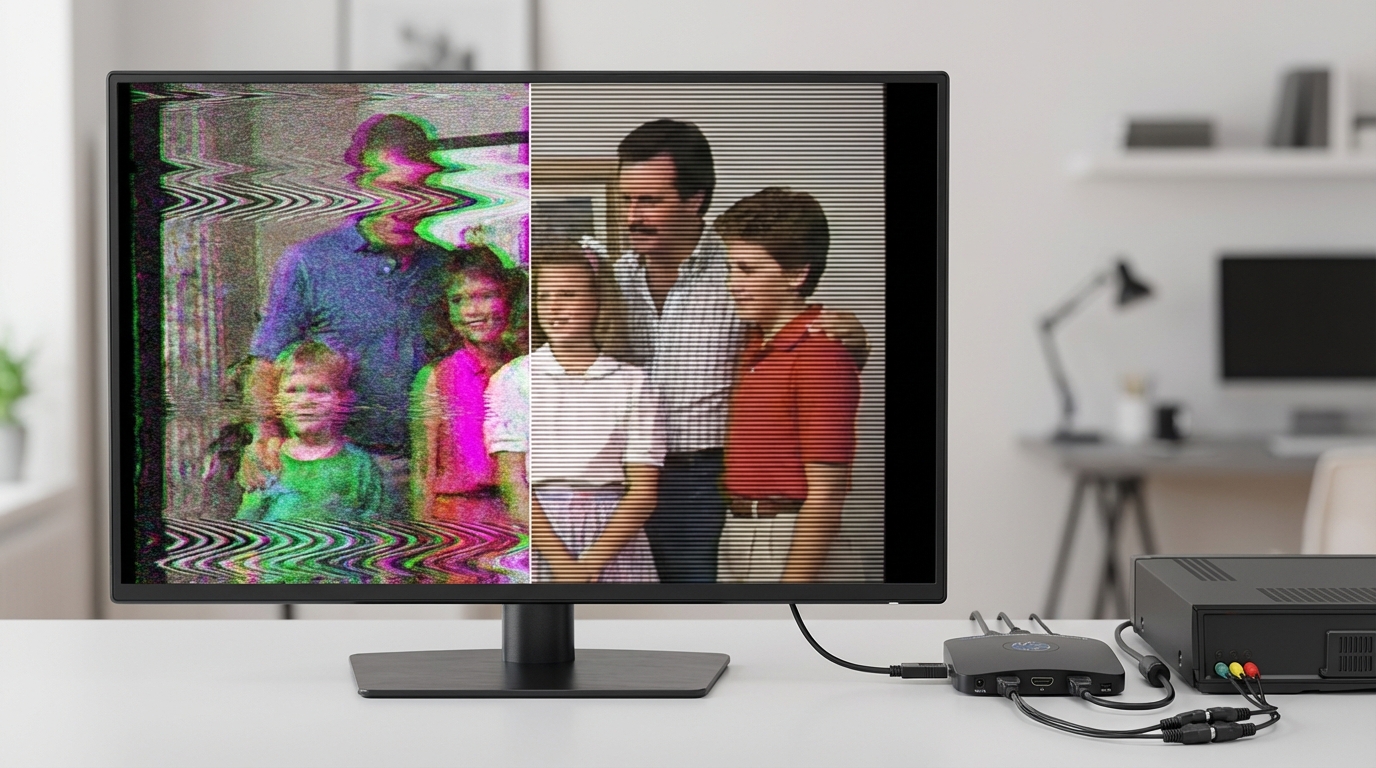
If you’ve been digitizing your old VHS tapes, Betamax recordings, or other analog video formats with your ClonerAlliance Box Pro, you’ve likely noticed significant quality issues on aged tapes: jittery playback, flickering images, color shifts, and audio-video synchronization problems. These aren’t just signs of wear—they represent fundamental technical challenges in analog video playback.
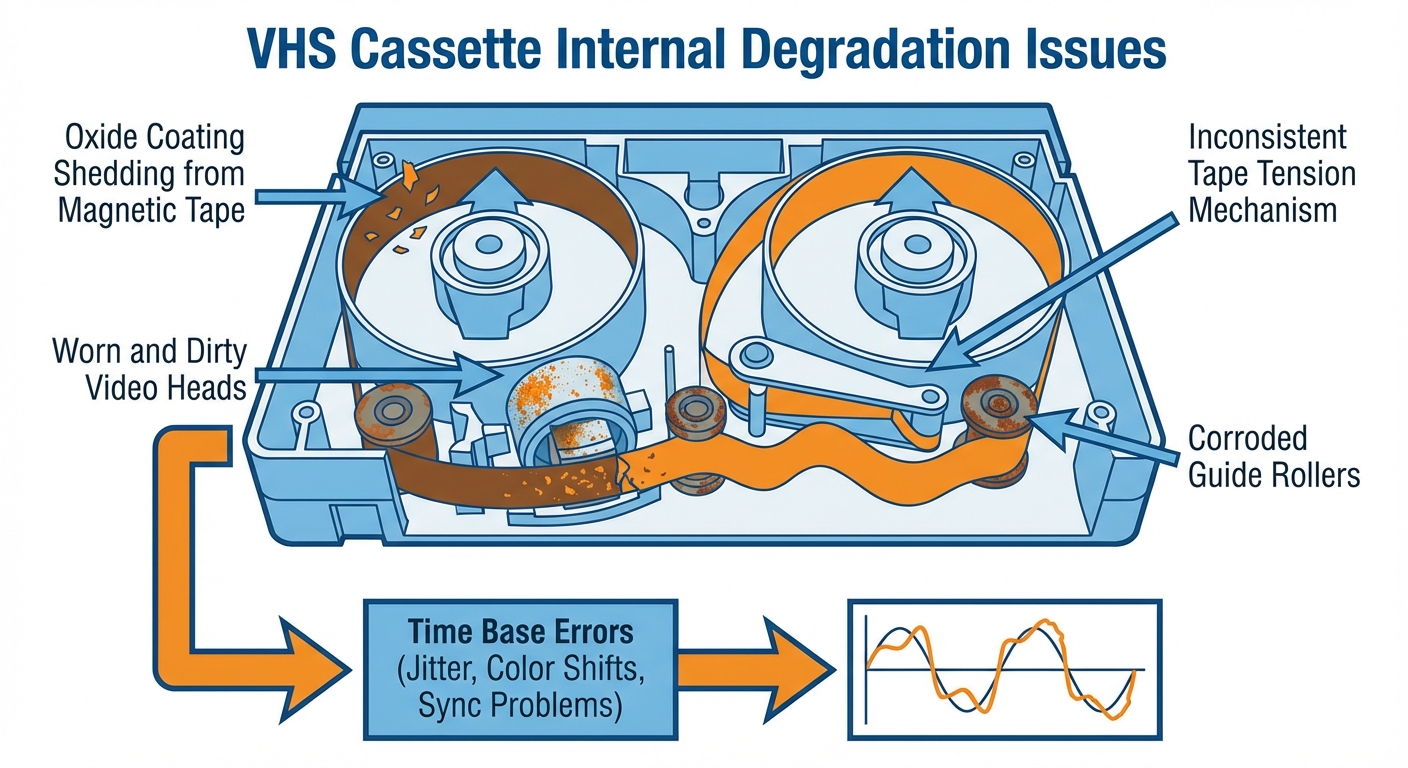
As magnetic tapes age over decades, the oxide coating deteriorates, tape tension becomes inconsistent, and playback mechanisms wear out. These mechanical instabilities create what engineers call “time base errors”—variations in the timing of video signal delivery that manifest as visual and audio artifacts in your digitized recordings.
The good news? Your ClonerAlliance Box Pro already includes sophisticated built-in signal stabilization technology that addresses these issues without requiring expensive external equipment.
What is Time Base Correction (TBC)?
Time Base Correction is a sophisticated technique used by professional archivists and video engineers to stabilize analog video signals before digital conversion. According to Wikipedia’s technical definition, TBC eliminates errors caused by mechanical instability in analog recordings by buffering the incoming video signal and re-releasing it at a consistent, stable rate.
Traditional TBC systems work by:
Capturing the unstable analog signal with all its timing variations
Buffering the signal in memory at the irregular incoming rate
Reconstructing sync signals to establish proper frame and line timing
Outputting the corrected signal at a perfectly stable, standardized rate synchronized to a reference clock
Professional standalone TBC devices like the Sony BVT-800 or FOR.A FA-410 have historically cost thousands of dollars and added significant complexity to video digitization workflows.
The Traditional Approach: External TBC Hardware
When professional archivists digitize historical footage, they typically construct a signal chain like this:
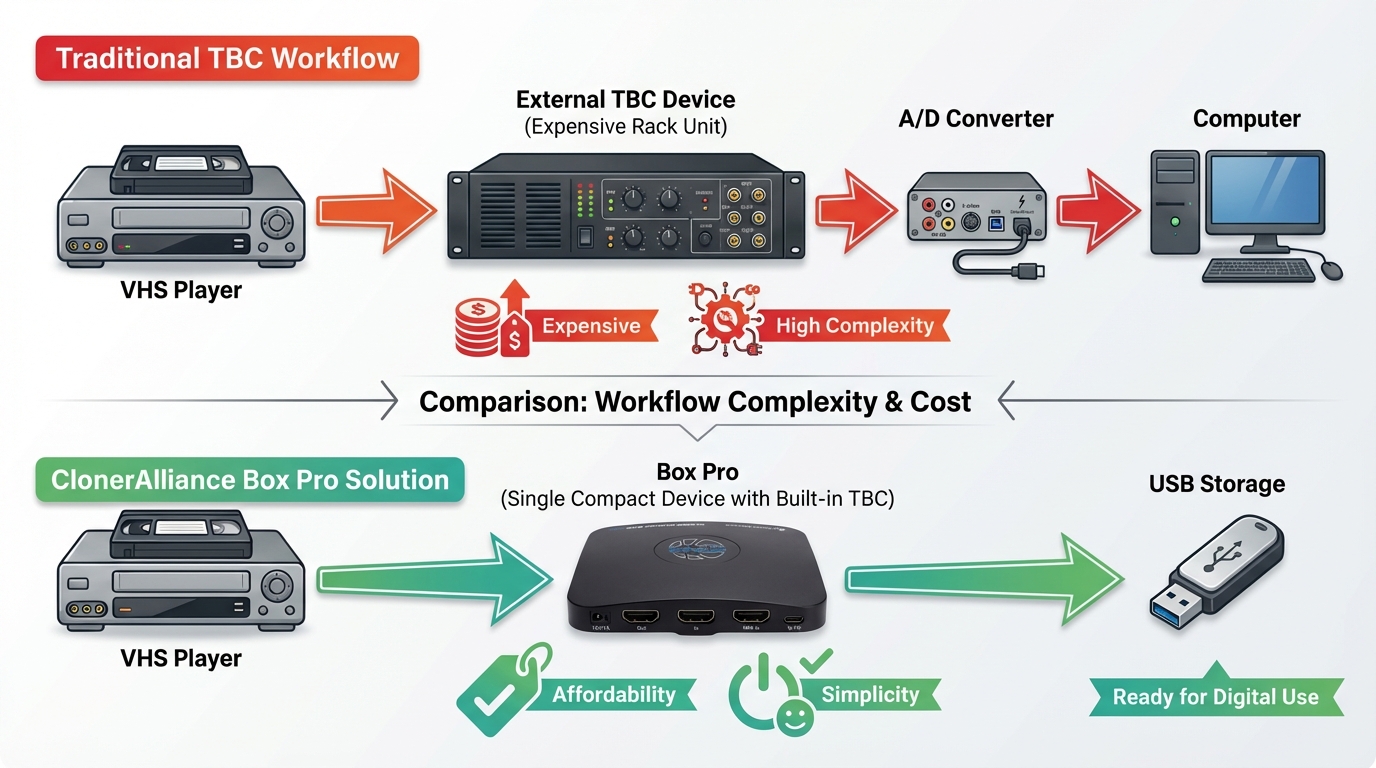
VHS Player → External TBC Device → Analog-to-Digital Converter → Computer
This approach has several drawbacks:
High cost: Professional TBC units range from $500 to $5,000+
Complexity: Requires understanding of sync generators, genlock, and broadcast video engineering
Space requirements: Multiple pieces of rack-mounted equipment
Setup difficulty: Precise timing adjustments needed using waveform monitors
Limited availability: Many legacy TBC devices are discontinued or hard to service
For home users and small studios digitizing personal video collections, this traditional approach presents significant barriers to preserving valuable analog video content.
ClonerAlliance Box Pro’s Integrated TBC Solution
Your ClonerAlliance Box Pro (CA-998P) incorporates built-in signal stabilization technology that performs the essential functions of professional Time Base Correction hardware—without requiring external devices or complex setup.
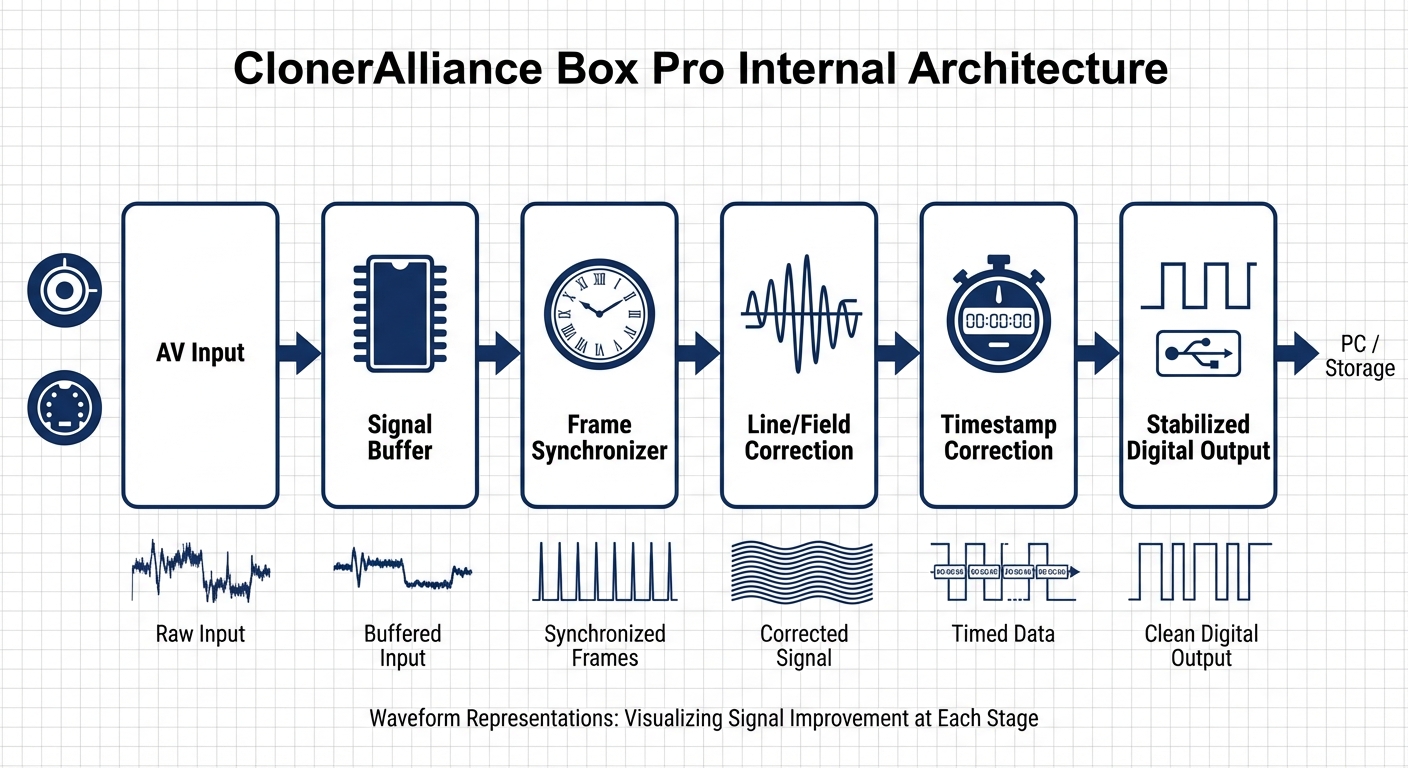
The Box Pro’s advanced AV input processing includes sophisticated analog signal handling that occurs before the analog-to-digital conversion stage. This pre-processing is crucial because time base errors must be corrected while the signal is still in analog form.
How Box Pro’s Built-in TBC Works
Frame Synchronizer Function
The Box Pro buffers incoming video frames in memory, ensuring output is delivered at a strictly consistent frame rate. This eliminates the frame-to-frame timing variations that cause jittery playback and audio sync drift.
The frame synchronizer:
Writes incoming video to buffer memory using the source’s irregular timing
Reads video from buffer using a stable crystal oscillator reference
Maintains consistent output even when source timing varies significantly
Prevents buffer overflow/underflow through intelligent frame management
Line and Field Correction
Beyond frame-level stabilization, the Box Pro’s AV decoder performs advanced analog processing that reconstructs incomplete field signals and corrects line timing errors:
Field completion: Detects and reconstructs missing or corrupted video fields
Line timing reconstruction: Rebuilds horizontal sync timing for each video line
Timestamp correction: Ensures proper temporal sequencing of video data
Dropout compensation: Fills in missing video information from adjacent lines/frames
Signal Quality Enhancement
The integrated signal processing also addresses common analog video problems:
Color stability: Corrects color subcarrier phase errors that cause hue shifts and color flickering
Jitter reduction: Smooths out mechanical vibration artifacts from aging VCR mechanisms
Sync regeneration: Rebuilds clean sync signals from degraded sources
Noise reduction: Minimizes tape noise and electronic interference
This comprehensive signal processing happens automatically every time you connect an analog source through the AV inputs on your Box Pro. No manual adjustments or technical expertise required—just connect your VCR and start recording.
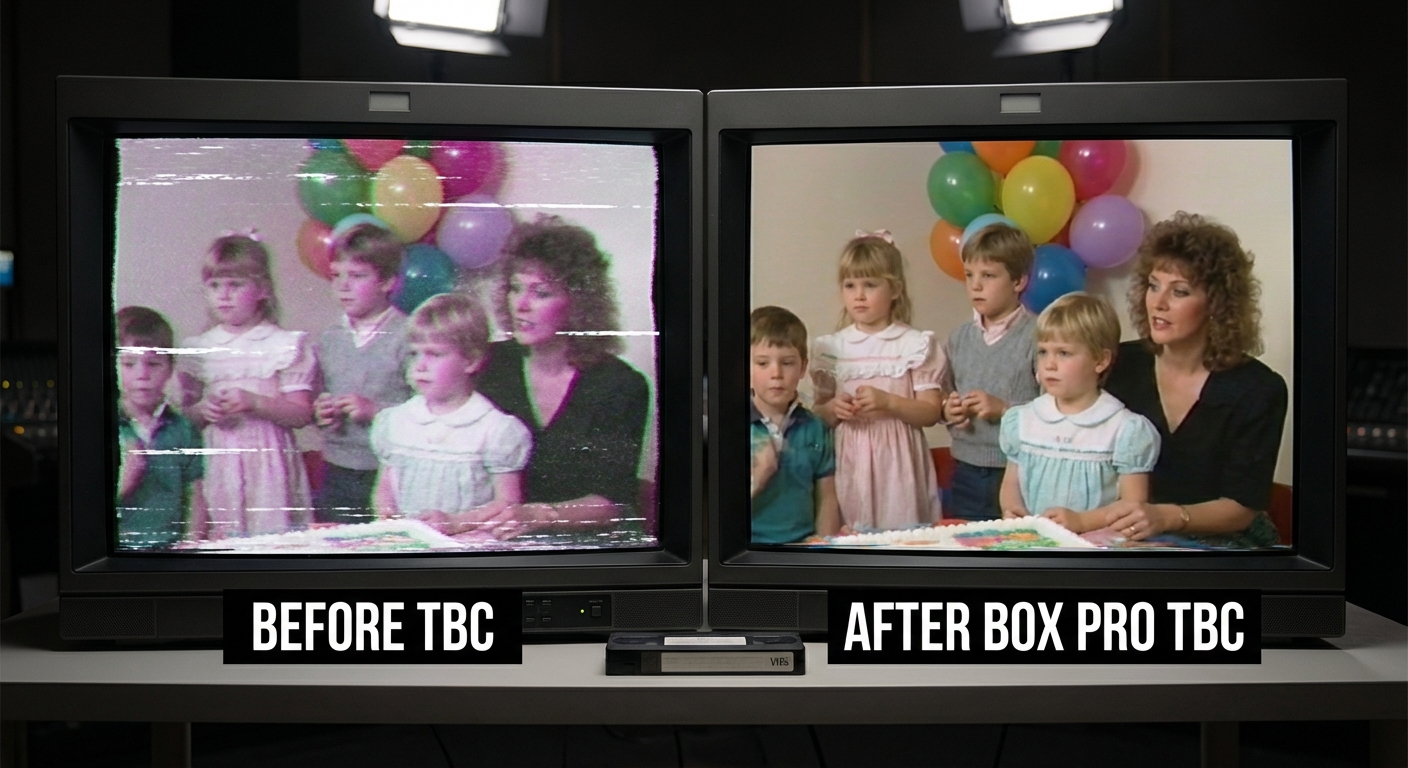
Real-World Benefits: Before and After
The difference between raw VHS playback and Box Pro’s time-base-corrected capture is dramatic:
Without TBC (Direct VHS Playback):
Visible horizontal jitter and image instability
Color shifts and hue flickering throughout playback
Audio gradually drifting out of sync with video
Intermittent frame drops and stuttering
Visible dropout artifacts (white specks, horizontal lines)
Vertical jitter at the top of the frame
With Box Pro’s Built-in TBC:
Stable, rock-solid image geometry throughout playback
Consistent, accurate color reproduction without shifts
Perfect audio-video synchronization maintained from start to finish
Smooth playback without stuttering or frame drops
Dropout artifacts minimized through intelligent line-replacement concealment
Clean, stable frame edges
Modern Software TBC vs. Hardware TBC
It’s worth noting that recent developments in software-based TBC (such as the open-source VHS-Decode project) can provide excellent results—but only when starting with RF-level captures using specialized hardware like DdD devices. These software solutions require:
Specialized RF capture hardware ($200-500)
Powerful computer for processing (hours per tape)
Technical expertise in command-line tools and signal processing
Multi-step workflow: RF capture → decode → TBC → color decode → encode
For most users, the Box Pro’s integrated hardware TBC offers the best balance of quality, convenience, and cost-effectiveness. You get professional-grade signal stabilization in a simple, one-device solution that works with any standard VCR or analog video source.
Application Scenarios for Box Pro’s TBC
The Box Pro’s built-in TBC functionality is essential for:
- Family Video Preservation
Digitizing personal VHS, Hi8, Video8, or Betamax tapes to preserve family memories with the best possible quality
- Small Archive Projects
Churches, schools, and community organizations digitizing historical video content without expensive broadcast equipment
- Content Production
Filmmakers and documentarians incorporating archival footage into modern productions
- Video Transfer Services
Small businesses offering tape-to-digital conversion services without major equipment investment
- Educational Digitization
Schools and universities converting instructional videos and historical recordings to digital formats
- Event Documentation
Digitizing wedding videos, sports events, and performances recorded on older formats
Why Choose Box Pro for Analog Video Capture?
- Integrated TBC - No External Hardware Needed
Eliminate the need for separate TBC hardware costing hundreds to thousands of dollars. Your Box Pro already has it built in.
- Simplified One-Device Workflow
Connect VCR → Box Pro → USB storage or TV. No complicated signal routing, sync generators, or timing adjustments.
- Compact and Portable Design
Portable device that fits in a small bag, versus racks of professional equipment taking up valuable space.
- No Technical Expertise Required
Automatic signal stabilization and correction without manual waveform adjustments or broadcast engineering knowledge.
- Consistent Professional Results
Reliable, repeatable performance across different tapes and source equipment.
- Multiple Input Options
Support for both HDMI (for modern sources) and composite AV/S-Video (for analog sources like VCRs).
- Direct Recording to USB Storage
Record directly to USB drives or external hard drives in standard MP4 format, ready for editing, sharing, or archival storage.
- Playback on TV
Review your digitized content immediately on your connected TV to verify quality.
Getting Started with Analog Video Capture on Box Pro
For the best results when digitizing analog video content with your Box Pro:
- 1. Prepare Your Equipment
Clean your VCR’s video heads using a head cleaning tape
Clean the tape path and ensure proper tape tension
Use high-quality AV or S-Video cables (S-Video provides better quality when available)
- 2. Connect Your Setup
Connect VCR to Box Pro’s AV inputs (composite + audio or S-Video + audio)
Connect Box Pro’s HDMI output to your TV for monitoring
Connect USB storage device (formatted as FAT32 or NTFS) to Box Pro
- 3. Configure Box Pro Settings
Select appropriate recording quality (higher bitrate for best quality)
Choose recording format (MP4 recommended for broad compatibility)
Enable audio mixing if you want to add live commentary
- 4. Monitor and Record
Preview the video on your TV before starting recording
Check for proper color, stability, and audio levels
Start recording and monitor the first few minutes to ensure proper sync
- 5. Preserve Your Originals
Always keep original tapes in climate-controlled storage as backups
Handle tapes carefully to minimize additional degradation
Consider recording multiple passes if tapes are extremely degraded
Tips for Best Quality:
If your VCR has S-Video output, use it instead of composite video for better quality
Record at the highest bitrate setting your storage device supports
Keep the Box Pro and VCR on a stable surface to minimize vibration
Let the VCR warm up for a few minutes before recording important tapes
Fast-forward and rewind tapes completely once before playing to even out tape tension
Comparing Box Pro with Other ClonerAlliance Products
While the ClonerAlliance Box Pro excels at analog video capture with built-in TBC, other ClonerAlliance products serve different needs:
ClonerAlliance Box Pocket (CA-997VL): Ultra-portable version with similar TBC capabilities, ideal for field work
ClonerAlliance UHD Pro Max (CA-989UPM): Focused on high-end 4K HDMI capture with cinema-quality recording
ClonerAlliance ViewLite AV (CA-996VL): Budget-friendly analog capture solution
For comprehensive analog video digitization from VHS, Betamax, Hi8, and other legacy formats, the Box Pro provides the perfect combination of professional signal processing, ease of use, and value.
Technical References
For those interested in the technical details of Time Base Correction:
Wikipedia: Time Base Correction - Comprehensive technical overview of TBC technology
Wikipedia: Frame Synchronization - Details on frame sync technology used in video production
VHS-Decode Project - Open-source software TBC implementation for RF captures
Conclusion
Time Base Correction is no longer exclusively the domain of high-end broadcast facilities with expensive equipment racks. Your ClonerAlliance Box Pro has democratized professional-grade video signal stabilization by integrating TBC-equivalent technology directly into an affordable, easy-to-use capture device.
Whether you’re preserving precious family memories, digitizing historical archives, or incorporating vintage footage into modern productions, your Box Pro eliminates the need for expensive external TBC hardware while delivering professional-quality results that rival dedicated broadcast equipment.
The era of complicated, multi-device video capture chains is over. With the Box Pro’s integrated frame synchronization, line/field correction, and intelligent signal processing, high-quality analog-to-digital conversion is now accessible to everyone—from home users preserving family videos to professionals digitizing commercial content.
Your investment in the Box Pro isn’t just a video capture device—it’s a complete professional-grade analog video digitization system in a single, affordable package.