Best storage device for 4K@60fps gameplay recording with ClonerAlliance UHD Halo
This article explains how to choose a storage device for 4K@60fps gameplay recording with the ClonerAlliance UHD Halo.
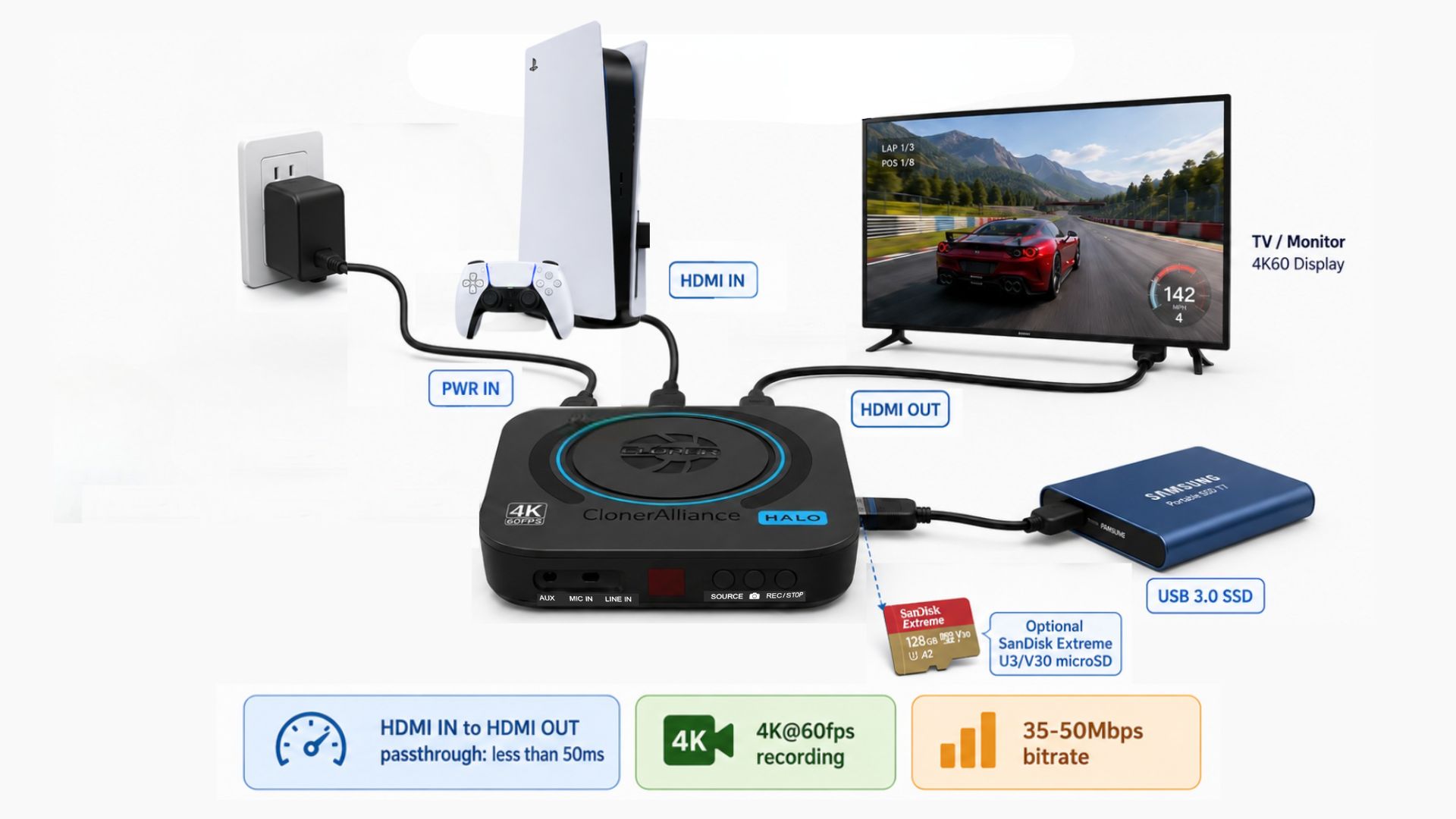
Recommended Gameplay Setup
For console or PC gameplay recording, use this connection path:
Connect the PlayStation, Xbox, or PC gaming system to HDMI IN on the UHD Halo.
Connect HDMI OUT on the UHD Halo to the TV or monitor.
Connect a storage device to the USB 3.0 port or insert a TF/microSD card.
Set the recording resolution to 4K@60fps.
Set the video bitrate according to the desired quality.
The HDMI IN to HDMI OUT passthrough latency is less than 50ms. For the best gameplay experience, play from the TV or monitor connected to HDMI OUT instead of relying on a PC preview window.
How Much Write Speed Is Needed?
The UHD Halo supports 4K@60fps recording with selectable bitrates up to 50Mbps.
Recording Bitrate |
Approx. Write Speed |
Approx. Storage Per Hour |
|---|---|---|
36Mbps |
4.4MB/s |
15.8GB |
50Mbps |
6.25MB/s |
22.5GB |
These write speeds are lower than the rated sustained write speed of a high-quality U3/V30 microSD card. However, real-world stability can still vary based on the storage device model, capacity, formatting, temperature, and long-session workload.
Recommended Storage Options
Best choice: USB 3.0 SSD
Use a USB 3.0 SSD for repeated professional use, long recording sessions, or multi-unit deployments. A USB 3.0 SSD generally provides better sustained write stability, heat handling, and capacity options than a small removable card.
Portable choice: U3/V30 microSD card
A genuine SanDisk Extreme U3/V30 microSD card should have enough bandwidth for 4K@60fps recording at 35-50Mbps. Use a 256GB or larger card when possible, and format it as exFAT before recording.
Usable with care: USB 3.0 flash drive
A high-quality USB 3.0 flash drive can work, but some low-cost flash drives may slow down during long continuous writes. Test the exact model before using it for important recording sessions.
For long capacity: external HDD
An external HDD provides large capacity, but it is not the first choice for the most demanding 4K@60fps gameplay workflow. If using an HDD, choose a reliable drive with stable power and avoid moving it while recording.
Suggested Settings
For 4K@60fps gameplay recording:
Input: 4K@60fps from the game console or PC
Passthrough: HDMI IN to HDMI OUT, less than 50ms
Recording resolution: 4K@60fps
Bitrate: 36Mbps for balanced file size, 50Mbps for higher quality
Codec: H.264 for best compatibility, H.265 for smaller files when supported by the playback/editing workflow
File system: exFAT recommended
Preferred storage: USB 3.0 SSD
Portable storage: U3/V30 microSD card
Best Practices Before Large-Scale Use
If you plan to use multiple UHD Halo units or record mission-critical gameplay sessions, test the complete setup first:
Test with the actual PlayStation, Xbox, or PC gaming system.
Test the exact HDMI cables and display.
Record at both 36Mbps and 50Mbps.
Compare the USB 3.0 SSD, USB flash drive, and microSD card that will be used in production.
Run a long-duration recording test and check the recorded file for smooth playback.